Environment/lighting artist
VFX 408
Concept and prepoduction
November 9th, 2025
VFX_408/update_13
Shot 1 Test Render
For the last weekend of the quarter, I spent my time on texturing and lighting the museum environment so that it could be ready for render. After a lot of back and forth with substance, I finally settled on this for the final look. This is the raw render with no compositing just yet.

Lighting the Environment
Lighting in Houdini is a bit challenging compared to programs like Maya and Blender, especially when it comes to instancing those lights. For this project I wanted to use light instancing to get the spotlights on each painting in the back. For this, I used a USD Configure Prims from Points node.

This allows me to instance primitives (or lights) on points. I'm bringing in some points from the SOP level into stage so I can use them as points to instance on.


Additionally, I'm using an HDRI and an area light directed on the display wall to brighten up the foreground. There is a hidden shadow catcher in the image below preventing HDRI's light from leaking through the opening.
Texturing the Environment
One of the best ways to achieve realism in 3D is by following a PBR workflow. Because I'm going for such a realistic look with this short, I didn't think procedural textures would be the fastest and best way to achieve realism. Therefore, I decided that I would use Substance Painter and Quixel Bridge for my surface work.

Fun fact about the artwork of the background paintings: they're filtered versions of my work from the past year at SCAD!
I then applied a canvas weave material on top of the original stylized artwork. I think it's a bit overkill for the distance that the paintings are viewed at, but the lighting does bounce off them nicely.

November 2nd, 2025
VFX_408/update_12
Moving to Houdini
I'm finally onto integrating the first environment into Houdini and prepping it for rendering. The first step, however, was readying the environment's UVs for texturing. I used Blender for this as it's a bit more straightforward than Houdini's UV toolset.

Next, I brought in the camera and environment as two separate alembic files. I then split each alembic down into 6 separate SOP networks for easy texture assignment and organization.

Each network looked somewhat like this, breaking down each of the models' individual sections for material assignment.

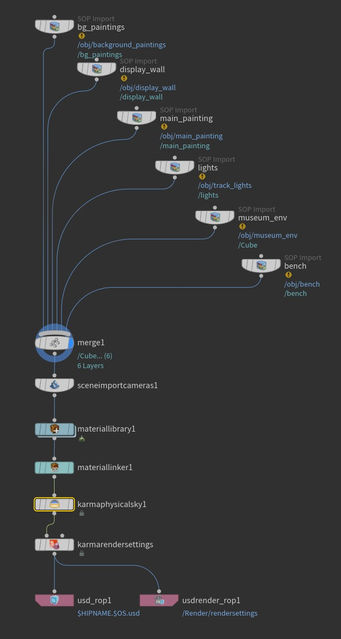
Afterwards I brought every mesh into Solaris with a relatively simplistic setup (left). I also went and created all of the necessary materials (bottom).

The next steps are creating the material and lighting setups and doing a test render for a transition composite.
October 26th, 2025
VFX_408/update_11
Modeling the Museum
I spent the past couple of weeks working on the basic museum environmentand compositing it with the layout of the first environment.
When I'm making an environment, it's important to me that I'm building the environment to scale. Not only does it help when it comes to tasks like scattering, but it also plays a massive part in lighting and FX. That's why, when modeling the museum, I used a human armature model to make sure the scale was correct.


My museum environment is based off of a real location, that being the Portland Art Museum. I really liked the minimalist, yet tasteful interior.
The environment is completely modeled around what the camera sees, as there aren't any reflections to be seen.

Additionally, I modeled some tracked lighting and placed temporary placeholder spotlights where other lights will go once in Houdini.

Nuke Test
Once I was done modeling, I quickly playblasted the new museum scene and the previous animatic environment. Since they're 2 separate scene files and will be handled the same way later in production, I wanted to see if I could devise a quick method for iteration. Below is what I came up with and what I've submitted for the class 15 checkpoint.
Below is the Nuke script. It's simple for the moment, but I plan to make it a bit more complicated as I move forward and begin working with render passes.

I tried a few methods, but I determined the best looking transition to be retaining parallax from frame 1 instead of doing a frame-hold until the camera gets close. This reduces the snappiness of the transition but it does break the illusion. I'll likely change this further down the line, but it's okay for now.
October 7th, 2025
VFX_408/update_10
Final Animatic
After some final tweaks to shot 3 and an actual ending, I've completed the entirety of the animatic. The final edit is below.
October 5th, 2025
VFX_408/update_09
Retiming the Animatic Cont.
I've further implemented the retiming changes all the way to shot 3. This has required some rethinking on the secondary transition, as I want time to conclude the animatic. By the end of the second shot only 20 seconds remain in the song. This resulted in having to shorten it down quite a bit.
September 30th, 2025
VFX_408/update_08
Retiming the Animatic
I spend the past couple of days figuring out how I'm going to retime the animatic to fit my chosen soundtrack from the last update. So far I've made it halfway through.
September 28st, 2025
VFX_408/update_07
Finding a Soundtrack
This weekend consisted of searching the web for a royalty free soundtrack that I could use in my animatic. The theme I am aiming for is an adventurous, grandiose track. I've placed the track that I think fits best with the animation along with a backup track below.
This is the track that I believe fits best. I am now realizing, though, that I will need to redo timings on the entire animatic in order to fit the soundtrack. That will be this week's task.
Additionally, I have an extra soundtrack that could potentially work better on timing.
September 21st, 2025
VFX_408/update_06
Finishing Touches
I spent the weekend making some touch-ups to the pacing of the animatic as well as redoing all of the shots to create more variety.
On top of this, I also finalized a rough look for the first environment after reducing its complexity.

Instead of a sprawling mountainscape with a town, I decided to go for a secluded valley approach with a few smaller structures. This also allows me to focus more on the scale of the environment rather than the complex little details.

Animatic Version 2
Here's the final animatic with all of the adjustments I've been making over the past couple of weeks. I also included the timecode and shot number so I can adjust the pacing later.
September 16th, 2025
VFX_408/update_05
Redoing the Second Transition
After working on the first transition, I realized the second transition from shot 2 to shot 3 also needed some work. I spent today remaking the transition.
Considering the cold environment the camera is traversing into, I decided that traveling through a freezer would be a fitting transition.
Further on I plan to include snow and steam in the fridge to show how cold it is.
September 14th, 2025
VFX_408/update_04
Diminishing the Scope
After talking with Professor Pasquale and a few of my friends I realized that the first shot of the animation was exceptionally ambitious for what I wanted to do. Instead of a valley with a whole town, I'm going to focus on the details of the environment from a closer perspective.
I spend this weekend working on the initial layout for the new environment along with some essential elements for the transition.

The environment is missing some generic tree and shrubbery layout as well as a river to complete the layout, but that's the next step.
Redoing the Transition
The more important task to complete this weekend was figuring out a creative and unique transition from shot 1 to shot 2. I decided to go with a transition where the camera goes through a house filled with water. I'm looking to further tweak it so that when exiting the house, the camera is under the lake in shot 2.
I was also tasked with deciding if I wanted to have the short be seamless with no cuts (ex. a drone flight) or to have cuts. I'm going to go with the latter as it allows me to curate the environment more for specific angles and focus on detail more easily.
September 7th, 2025
VFX_408/update_03
Final Rough Animatic
I've spent the last few days of summer blocking out and polishing the final animatic. Each shot is split into its own scene so that I could keep things organized. However, this did introduce some timing problems between cuts. The camera stops moving between shots which wasn't my original intention. That will be polished later on when I begin working on the first scene.
As for the final animatic, you can view it below!
September 3rd, 2025
VFX_408/update_02
Animatic Progress
To begin preparing for this exceptionally long project, I started with creating an animatic showcasing all of the basic layout and camera movements to get the idea across. This also helps with pacing for the short.
The layout of the environment is quite simple, consisting of a few duplicated premade mountain assets and a sculpted terrain to match the previs reference.

The finished first of three parts of the animatic can be seen below.
VFX_408/update_01
August16th, 2025
Concept
For my senior project at SCAD, I want to create 3 massive environments and interconnect them through a series of paintings in a gallery. Essentially, the camera will be "diving" into each of the painting, showing a vast 3D environment that the viewer will navigate. It's like the viewer will be on a drone with infinite battery and range!
The main inspiration for the idea comes from the Coca-Cola Masterpiece ad, shown below:
I want to go for natural environments mixed in with some human elements. I appreciate the chaos and beauty of nature and I would like to express it in this short.
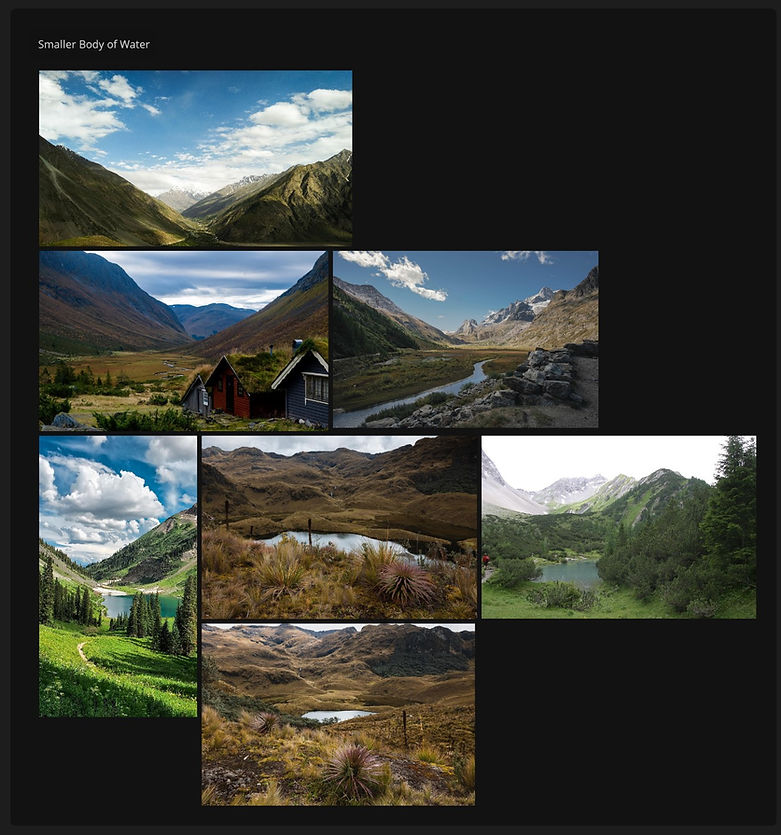
To get started, I've created a mood board of sorts for early conceptualization of the environments I'll be creating. I used PureRef to create the mood board.
Mood Board